Instagram Reels Downloader
Save any public Instagram Reel as an HD MP4 file. Fast, watermark-free, works on all devices. The most used tool on IGSave - handles standard Reels, collaborative Reels, and Reels from public business and creator accounts.
Download any Instagram Reel as HD MP4 in seconds. Works on iPhone, Android & PC — no app, no account needed.
IGSave is a free, browser-based Instagram downloader that supports every type of content on the platform. Whether you need to save an Instagram Reel as an MP4, download a Story before it disappears in 24 hours, extract MP3 audio from a video, or download a full carousel of photos - IGSave handles it all with a single paste-and-click workflow.
Instagram does not provide a built-in option to download most of its content. IGSave fills that gap: paste any public Instagram link, click Download, and get the original file saved to your device in seconds. No app to install, no account to create, no watermark added ever.
IGSave also supports TeraBox video downloads, Facebook Reel downloads, and YouTube video downloads — all from the same platform.
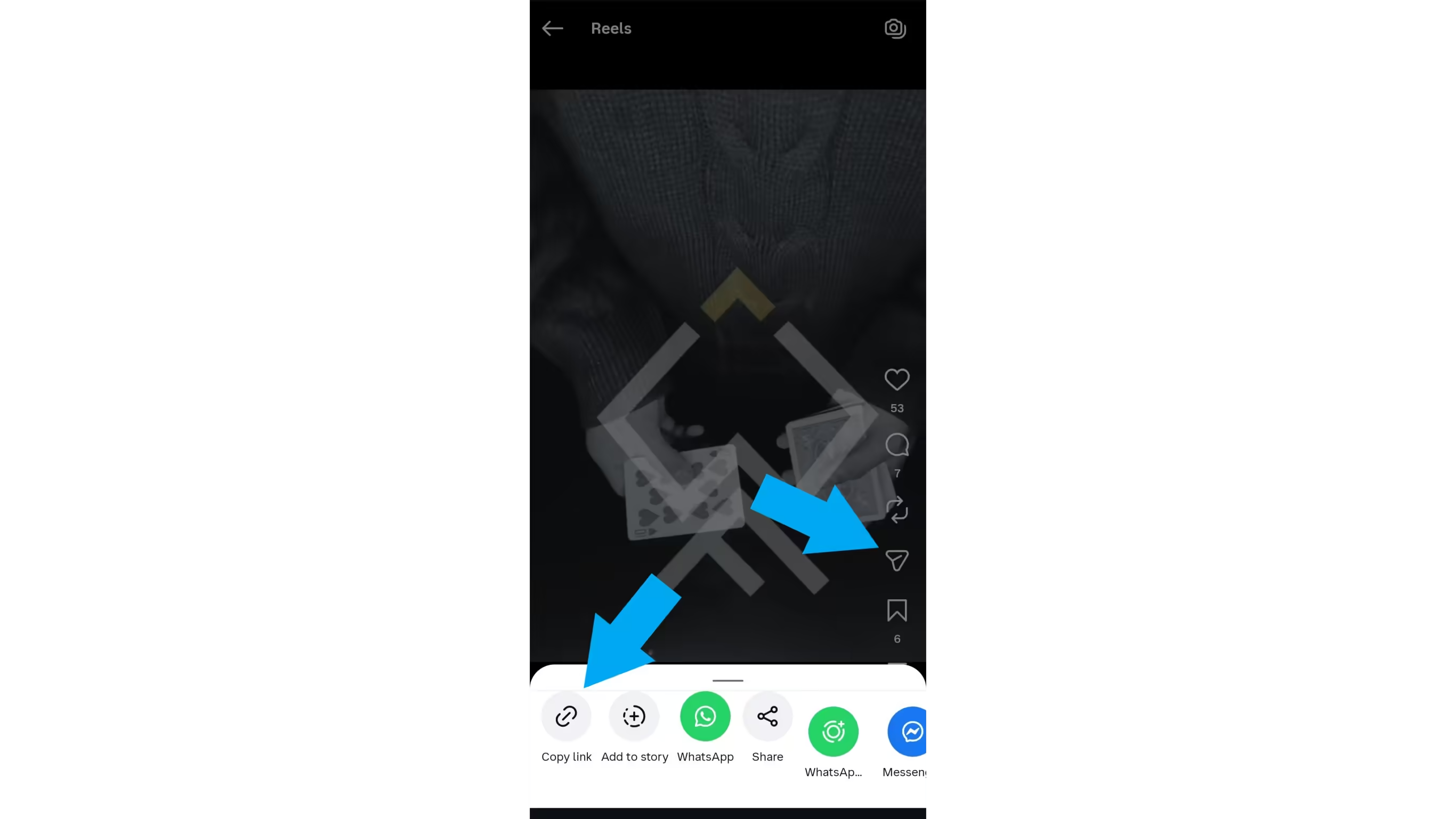
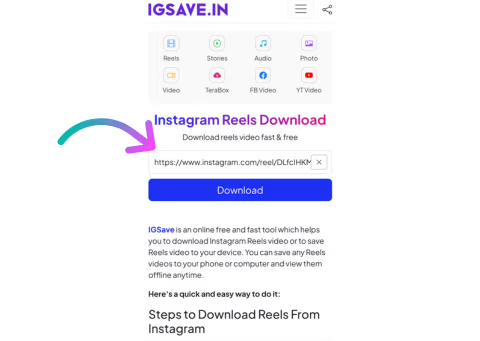
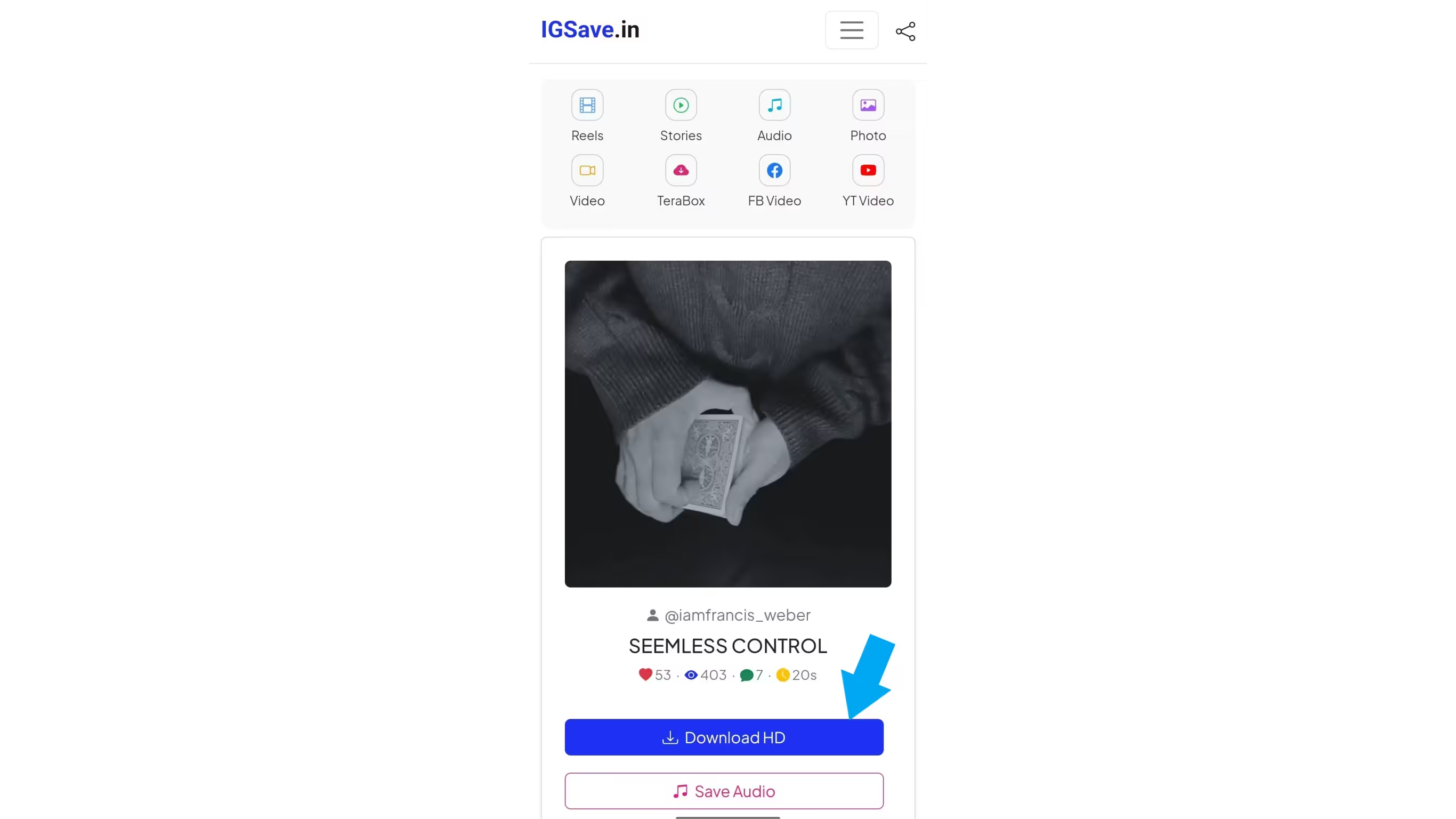
The entire process takes under 30 seconds on any mobile connection.
IGSave covers every type of Instagram content. Each tool is free, requires no login, and saves files in their original quality with no watermark.
Save any public Instagram Reel as an HD MP4 file. Fast, watermark-free, works on all devices. The most used tool on IGSave - handles standard Reels, collaborative Reels, and Reels from public business and creator accounts.
Download Instagram feed videos and IGTV episodes as MP4 in their original resolution. Supports single video posts and long-form IGTV content. No app needed - paste the link, click download.
Save Instagram Stories and Highlights before they disappear. Download video Stories as MP4 and photo Stories as JPG, completely anonymously — your username never appears in the viewer list. Also supports Highlights (pinned Story collections).
Download Instagram photos in their original full resolution as JPG files. Supports single photos, profile photos, and carousel (multi-photo) posts - all images from a carousel post can be downloaded individually.
Extract and save the audio track from any Instagram Reel, video, or IGTV as a high-quality MP3 file. Perfect for saving trending audio, background music, voice recordings, or IGTV talks as audio-only files. Use as ringtone or for offline listening.
Download videos shared via TeraBox (Dubox) links directly to your device - no TeraBox account required. Paste the TeraBox video link and download in seconds.
Download Facebook Reels, videos, and Shorts to your device as MP4. Paste the Facebook video link and save it in HD quality, free.
Save YouTube videos to your device for offline viewing. Paste the YouTube URL into IGSave and download in your preferred quality.
IGSave is a web-based Instagram downloader - there is nothing to install and nowhere to log in. When you paste an Instagram link, IGSave fetches the media file directly from Instagram's public content delivery network (CDN) and passes it to your browser as a downloadable file. The whole process is server-side, meaning the video is never re-encoded or compressed by IGSave - you receive the same file Instagram hosts, at the same quality the creator originally uploaded.
Because IGSave never uses your Instagram account or credentials to access any content, the process is completely anonymous. You are never added to a post's view count, and the account owner receives no notification that their content was accessed through IGSave.
Open Safari on your iPhone (recommended over Chrome for iOS, as it handles downloads most smoothly). Copy the Reel link from Instagram, go to igsave.in, paste the link, and tap Download. Look for the download arrow icon in Safari's toolbar. Tap it, then tap the file to open it - you can share it to your Photos app or leave it in Files. Works on iOS 13 and above.
Open Chrome or your default browser on your Android device. Copy the Reel link from Instagram, go to igsave.in, paste the link, and tap Download. The MP4 file saves to your Downloads folder immediately and a notification appears in your notification bar. Tap the notification to open the video directly in your gallery.
Open any browser on your Windows PC or Mac - Chrome, Firefox, Edge, or Safari. Copy the Reel link from the Instagram website, go to igsave.in, paste the link, and click Download. The MP4 file saves to your browser's default downloads folder (usually Downloads). Open it in VLC, Windows Media Player, QuickTime, or any video player.
Downloading Instagram Reels and videos for personal, offline viewing is generally accepted. However, redistributing, re-uploading, or using downloaded content for commercial purposes without the original creator's permission may violate Instagram's Terms of Service and applicable copyright law. Always respect the rights of the content creator — download only what you are permitted to use.
IGSave complies with 17 U.S.C. § 512 and the Digital Millennium Copyright Act (DMCA). If your copyrighted material has been downloaded or linked through IGSave and you wish to report a concern, please contact us through the Contact page.
IGSave is an independent service. We are not affiliated with, endorsed by, or in any way connected to Instagram, Meta Platforms, YouTube, Facebook, TeraBox, or Dubox.